AI-generated backgrounds & branded quote cards
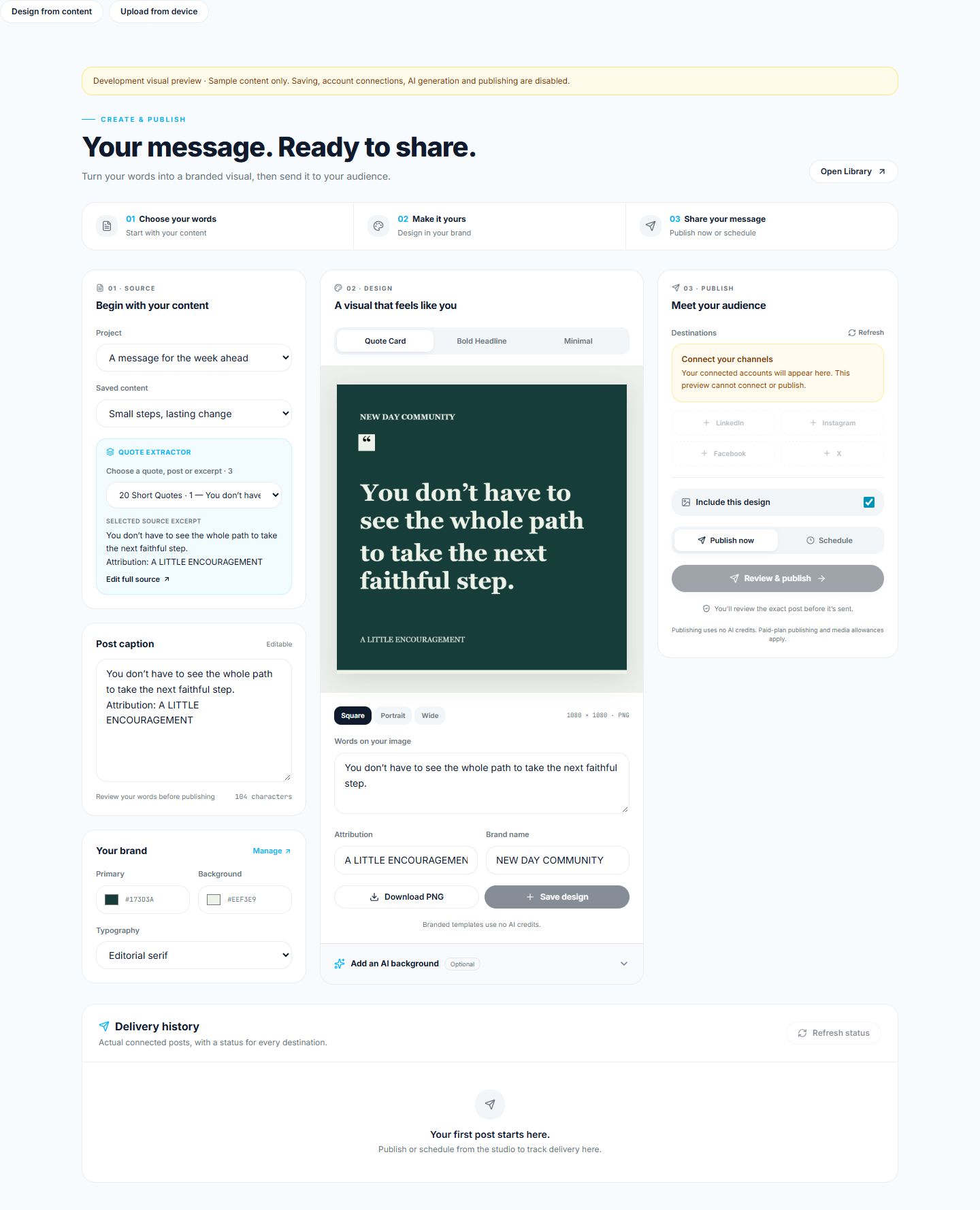
Create a visual in your brand colors, preview it at full size and save it to your design library. Each successful AI-generated background uses 10 credits.
Turn podcasts, videos, talks and lessons into useful content. Transcribe, translate, repurpose, design quote cards, upload your images and finished videos, then schedule or publish supported social updates and track delivery in one workspace.
One workspace. From your words to your next post.
The actual Create & Publish interface, shown with sample content.
Fast
Full messages processed quickly
Many
Multiple content formats
Global
Multilingual workflow
Flexible
One unified credit system
Create & Publish
01
Create a design or upload an image or video
02
Choose your connected accounts
03
Publish now or schedule
What you get
Create only what you need — transcripts, translations, blogs, social posts, YouTube content, emails, quotes, study notes, and export-ready files.
Punctuated, paragraphed, and easy to edit.
Faithful translations in 12+ languages.
A publication-ready written article.
Captions, hooks, and short posts.
Titles, description, tags, and a pinned comment.
Show notes, summary, and key takeaways.
A polished email to your list.
Pull-quotes ready for graphics.
Structured outlines for teaching.
Premium export-ready documents.
Who it's for
Turn each episode into show notes, articles and social posts.
Give every video a new life in captions, posts and newsletters.
Share your lessons and ideas in clear, useful content.
Turn presentations and expertise into content for your audience.
Carry the ideas from your talks and books into your next post.
Share messages, reflections and resources with your community.
The workflow
Capture audio live or upload MP3, WAV, M4A, MP4 and more.
Edit your transcript, translate it and turn it into blogs, social posts, show notes or lessons.
Make a branded quote card, create an AI-generated background or upload your own JPG, PNG or finished MP4.
Pick your accounts, then post now or schedule for later.
See when each post goes live, and what needs your attention.
Publish your own content to your own connected accounts — when you choose.
Works with Facebook Pages and Instagram business or creator accounts. Supported formats vary by platform.
Made a video in KindraVid or another tool? Download it, then upload it here.
See plans and pricingCreate a visual in your brand colors, preview it at full size and save it to your design library. Each successful AI-generated background uses 10 credits.
Upload JPG, PNG or MP4 files, add a caption and use the existing publishing workspace. Downloads from KindraVid work through this device-upload flow.
Publish your own content to your own connected accounts — when you choose. Choose from 10 supported platforms; available accounts and formats vary by platform. A post sent to three accounts counts as three posts toward your plan. Posting uses no credits.
See Scheduled, Publishing and Published status, plus failures that need attention.
Credits
Credits let you decide how to use your plan. Transcribe only, repurpose deeply, translate for global audiences, or create a complete content package from one message.
Credits reflect the value created, not how fast the system runs. Use only what you need — every workflow is different.
Why us
Full messages can be processed quickly so you can move from recording to usable content without waiting days.
Turn one podcast, video, talk or lesson into useful content for different platforms.
Use credits your way. Pay for the workflow you actually use, not features you do not need.
FAQ
Credits are a usage allowance for AI features in KoinoScript. They have no cash value, are not transferable or redeemable for cash, and cannot be used outside the app.
Start with 50 free credits and turn your next recording into ready-to-use content.